
User Access Controls for Auto Repair Shops
A technician is finishing a brake job while a service advisor logs the repair order and a part-time employee refreshes the Digital Shop Board. Someone notices a discounted invoice that the technician shouldn't have been able to create. Then a parts order is voided, and nobody can tell who changed it or why. The shared shop login made the workflow feel faster, but it also erased accountability.
User access controls give every person the access needed for the job, and no more. In an auto repair shop, that means a technician can document an inspection without changing tax settings, an advisor can communicate with customers without controlling payroll, and an owner can review analytics without relying on a shared password. The result is a workflow that protects revenue, customer records, and the people working in each bay.
Table of Contents
- The Moment a Shop Realizes It Needs User Access Controls
- What User Access Controls Really Mean for a Repair Shop
- Common Access Models and Which One Fits Your Shop
- A RedAppy Permission Matrix You Can Copy Today
- Best Practices for Tightening Access Without Slowing the Bay
- Two Shop Stories of What Changed When Access Got Serious
- Your Implementation Checklist and Where to Go Next
The Moment a Shop Realizes It Needs User Access Controls
The problem usually becomes visible during a busy handoff. A technician completes a digital inspection, an advisor turns the findings into an estimate, and a manager checks whether the customer approved the recommended work. If all three people use the same credentials, the system can't reliably distinguish a technical update from an invoice change or a settings adjustment.
That confusion creates practical consequences. A technician might apply a discount outside the shop's approval process. A counter employee might cancel a parts request while trying to correct a duplicate. A manager might spend valuable time reconstructing events from memory, messages, and vendor records instead of looking at a clear activity history.
Practical rule: Every sensitive action should have a named person behind it, a defined reason, and an appropriate approval path.
A repair shop doesn't need an elaborate IT department to apply this rule. It needs a simple operating decision: identify the job each person performs, connect that job to a role, and restrict actions that can affect money, customer commitments, inventory, or business settings.
Start with the workflow, not the software menu
The first review should follow a vehicle through the shop:
- Who creates or edits the inspection?
- Who prepares and finalizes the estimate?
- Who orders parts?
- Who approves a write-off or unusual discount?
- Who communicates approval requests to the customer?
- Who reviews performance and financial information?
The answers reveal where shared access is creating risk. They also show where a permission change might slow the bay if it forces employees to request approval for routine work.
The right design keeps ordinary work direct while placing deliberate friction around irreversible or high-impact actions. A technician shouldn't need a manager to add inspection photos. A manager should be involved before a write-off, invoice finalization, or sensitive settings change.
Accountability protects more than security
Clear access records help owners investigate billing questions, warranty disagreements, inventory discrepancies, and employee handoffs. They also make training more focused because a manager can see whether a user needs help with a process or is attempting work outside the assigned role.
Access controls become especially valuable during turnover. When a technician, advisor, or counter employee leaves, a named account can be disabled without disrupting everyone else. When a new hire joins, the shop can assign a starting role, observe one work order, and expand permissions only after the workflow requires it.
That is the shift in thinking. User access controls aren't an IT checkbox. They're a shop-floor safeguard that answers who did what, when, and why.
What User Access Controls Really Mean for a Repair Shop
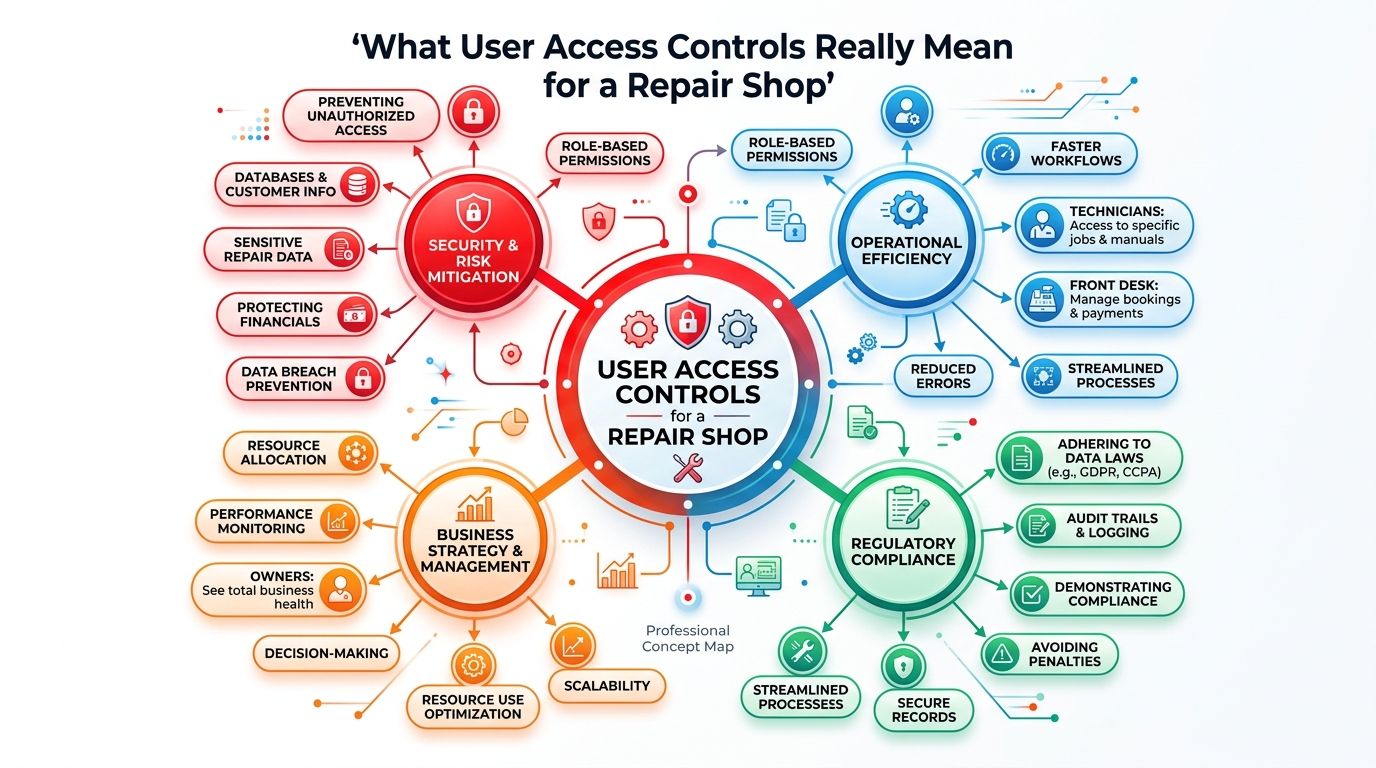
User access controls are the rules that decide who can sign in, what information they can view, and which actions they can perform inside a shop management system. The physical version is easy to understand. The front door, parts cage, office safe, and owner-only drawer don't use identical keys because the people using them have different responsibilities.
A repair system needs the same separation. A technician needs inspection and repair-order tools. A service advisor needs customer communication and invoicing workflows. A parts manager needs ordering and supplier screens. An owner needs analytics and administrative controls. Giving every person the same access is the digital equivalent of handing every employee the master key.
For broader background on the physical and digital principles involved, provides a useful explanation of how access systems separate authorized users from restricted areas.
The three questions every permission should answer
A practical access policy answers three questions:
- Who is the user? Each employee needs an individual account rather than a shared shop login.
- What does the user need to see? Visibility should match the work, especially for customer, payroll, tax, and financial information.
- What can the user change? Viewing an inspection is different from editing it. Drafting an estimate is different from finalizing an invoice.
That distinction matters because shared accounts erase the audit trail. If a customer disputes a charge or a vendor questions an order, the owner can't determine whether the action came from a technician, advisor, manager, or temporary employee. The shop then relies on recollection, which is weakest when the bay is busy.
Access follows the employee lifecycle
User access controls also support hiring, training, transfers, and departures. A trainee can begin with view access and supervised editing. A senior advisor can receive approval rights without gaining access to payroll settings. A departing employee can be disabled while historical records remain connected to the correct account.
This design helps managers set expectations early. Employees know which tasks belong to their role, which changes require approval, and where to ask for help. The system reinforces the operating model instead of leaving permissions to informal habits.
Common Access Models and Which One Fits Your Shop
Three access models matter most in an auto repair environment. Role-based access control, or RBAC, grants permissions according to a job role. Attribute-based access control, or ABAC, uses conditions such as location, shift, or customer type. Least privilege gives each person only the access required for current duties.
RBAC is the practical foundation for most shops because repair workflows already use recognizable roles. A technician, service advisor, parts manager, and owner perform different work even when they share the same location and software. The National Institute of Standards and Technology defines RBAC around permissions attached to roles rather than individual users, with least privilege and role hierarchy helping organizations manage access as responsibilities expand.
How the models differ
| Model | How It Works | Best Fit For | Complexity | Typical Shop Size |
|---|---|---|---|---|
| Role-based access control | Assigns permissions to defined job roles | Shops with stable technician, advisor, parts, and management duties | Low to moderate | Single-bay through multi-location |
| Attribute-based access control | Applies rules based on location, shift, customer type, or other conditions | Operations with different branches, schedules, or approval limits | Moderate to high | Growing multi-location operations |
| Least privilege | Limits each account to the minimum access needed | Every shop, especially where money, settings, and customer data need protection | Low when layered onto roles | Any size |
RBAC maps cleanly to daily work. A four-employee shop can create a small set of roles and avoid managing permissions person by person. A multi-location business can use role hierarchy to keep common workflows consistent while allowing location-specific assignments.
ABAC adds value when a job title alone isn't precise enough. A parts manager might order routinely used items but need approval for a high-value order. A regional manager might view analytics across locations, while a site manager sees only the assigned shop. A user might be allowed to review information during a shift but not access sensitive reports outside operating procedures.
Least privilege should sit underneath both models. It prevents a role from becoming a convenient bundle of unrelated powers. The trade-off is administrative effort. If access is too narrow, employees stop following the process and work around the system. If access is too broad, the shop creates unnecessary exposure and weakens accountability.
The strongest path is straightforward: start with RBAC tied to RedAppy roles, apply least privilege to each permission, and introduce ABAC only when location, timing, or approval complexity makes it worthwhile. Owners should choose based on head count, turnover, number of locations, and the level of audit detail required.
A RedAppy Permission Matrix You Can Copy Today
A permission matrix turns vague policy into a working assignment. The matrix below covers six common shop roles and six feature areas: Digital Inspections, Invoicing, Parts Ordering, Customer Communications, Analytics, and Settings.
The permissions use four actions:
- View, the user can see information.
- Create/Edit, the user can add or change working records.
- Approve, the user can authorize a high-impact action.
- No Access, the feature is hidden or unavailable.
The matrix should be copied into the shop's user-management process and adjusted for staffing. A small shop may combine the service manager and owner roles. A larger operation may split parts approval, accounting, and regional analytics into separate positions.
| Role | Digital Inspections | Invoicing | Parts Ordering | Customer Communications | Analytics | Settings |
|---|---|---|---|---|---|---|
| Owner | View, Create/Edit, Approve | View, Create/Edit, Approve | View, Create/Edit, Approve | View, Create/Edit, Approve | View, Create/Edit | View, Create/Edit, Approve |
| Service Manager | View, Create/Edit, Approve | View, Create/Edit, Approve | View, Create/Edit, Approve | View, Create/Edit, Approve | View, Create/Edit | View, Create/Edit |
| Lead Technician | View, Create/Edit | View, Create/Edit | View, Create/Edit for requests | View, Create/Edit for technical notes | View limited shop metrics | No Access |
| Technician | View, Create/Edit | View draft estimates | View, Create/Edit for requests | View, Create/Edit for technical notes | No Access | No Access |
| Service Advisor | View, Create/Edit | View, Create/Edit, not final approval | View, Create/Edit for requests | View, Create/Edit, Approve customer messages | View operating metrics | No Access |
| Bookkeeper | View completed records | View, Create/Edit, Approve financial items | View | View transaction-related messages | View financial analytics | No Access |
Keep the critical separations visible
The matrix works because it separates preparation from approval. Technicians can document inspection results and contribute to estimates, but they don't finalize estimates or control billing decisions. Service advisors can build customer-facing invoices and request parts, while managers approve write-offs and exceptions.
Parts requests should route through advisors or the designated parts process rather than allowing every employee to place unrestricted orders. That keeps the customer authorization, vendor communication, and inventory record connected.
Settings deserve the narrowest assignment. Owners should control payroll and tax settings. Service managers can maintain workflow settings that affect daily operations, but they shouldn't be able to alter financial configuration without oversight.
Treat the Digital Shop Board as a shared view
The Digital Shop Board can remain visible to the team because it coordinates vehicle movement from check-in through checkout. Visibility supports handoffs. Configuration is different. Everyone may need to see job status, but only service managers should reconfigure the board, stages, or workflow rules.
RedAppy supports customized user access and permissions tied to specific companies or products, with rights such as add, edit, delete, and view-only. That makes this matrix a useful starting structure, not a rigid template. Managers can adjust it as duties change, while keeping approval boundaries intact.
Best Practices for Tightening Access Without Slowing the Bay
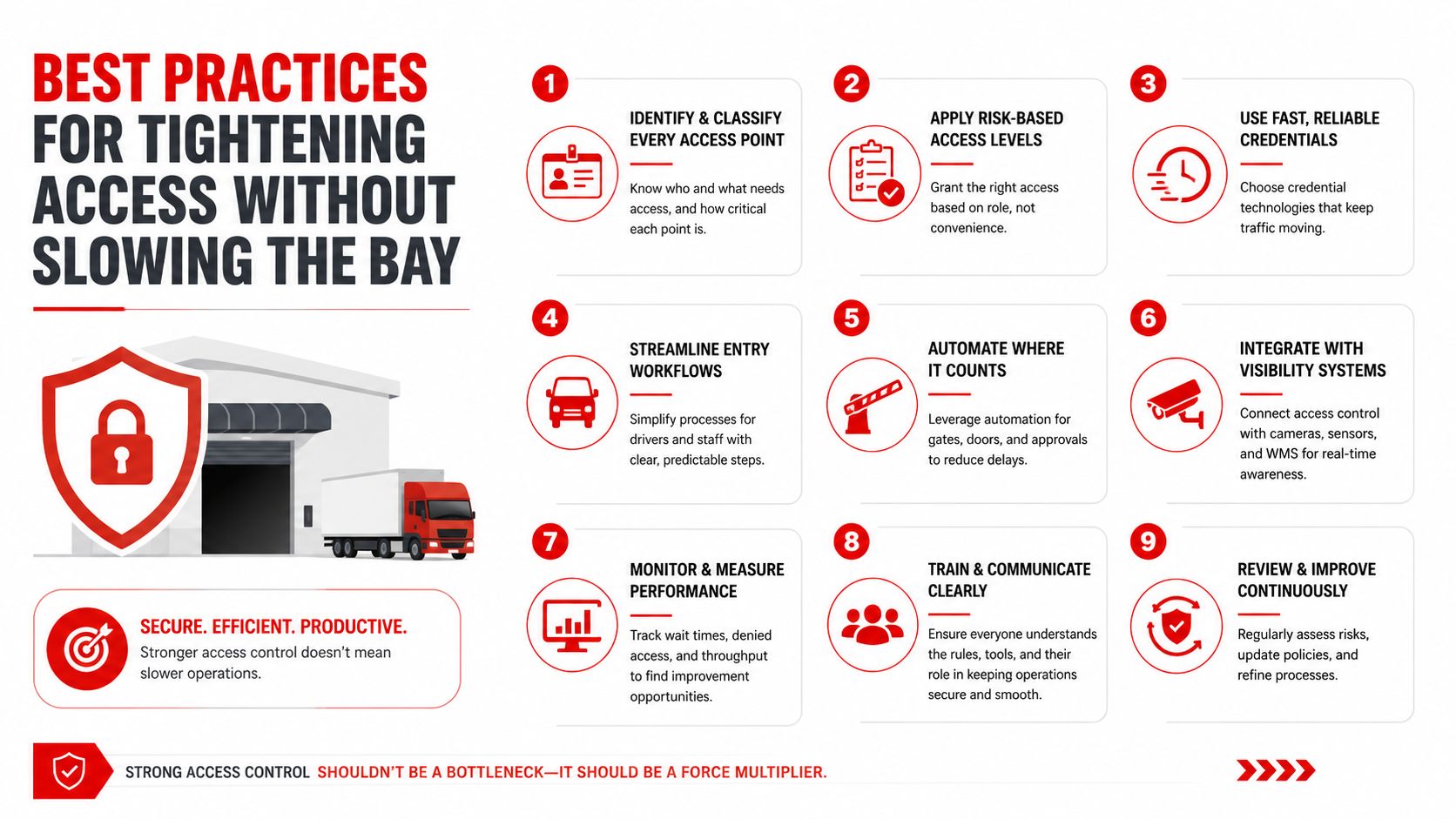
Security fails when it becomes so inconvenient that employees bypass it. A workable routine protects the shop without making a technician wait for permission to upload an inspection photo or add a repair note.
Begin every account at the narrowest useful role
Create a new user with the minimum role that supports the first assigned task. A trainee may need to view repair orders and add inspection details. A new service advisor may need customer communication and draft invoicing, but not final approval or settings access.
Expand permissions only when a real workflow requires them. The manager should be able to name the task that justifies the change, such as approving a vendor order or reviewing location analytics. This keeps role changes tied to operations rather than convenience.
Enroll MFA during a normal shop task
Multi-factor authentication requires independent proof categories. A password and PIN are both knowledge factors, so they don't qualify as MFA. A password paired with a one-time code, access card, hardware token, or biometric check combines different categories of proof.
Enrollment can happen during the first supervised work order:
- The manager creates the named account.
- The employee registers the approved phone or security device.
- The employee signs in and completes a test action.
- The manager confirms that the account reaches only the assigned screens.
- The employee stores recovery information through the approved process, not in a shared text or email.
Managers and owners should receive MFA before technicians because their accounts can change permissions, approve financial actions, or access sensitive reporting.
Use simple onboarding and offboarding triggers
Onboarding should include credentials, role assignment, MFA registration, and one shadowed repair order. The new employee should demonstrate the normal path from inspection or customer contact to the next handoff.
Offboarding should happen the same day employment ends or access is no longer needed:
- Disable the account: Prevent further sign-ins before the employee leaves the premises.
- Transfer open work: Reassign tickets, estimates, customer conversations, and parts requests.
- Preserve history: Keep completed records connected to the former user's account for review.
- Check shared devices: Rotate access on shop tablets and remove saved sessions.
SSO can reduce repeated sign-ins when it's available, but it doesn't replace individual roles. Shop tablets should be rotated between users rather than left permanently signed in. Password resets should never be emailed as plain credentials.
Review logs as a management habit
Managers should perform a short weekly audit-log review, focusing on permission changes, invoice approvals, write-offs, parts cancellations, and settings updates. The owner should complete a full user review monthly, checking inactive accounts, role changes, and permissions that no longer match the employee's duties.
NIST treats audit logs as a controlled access domain, which means the people who operate access systems don't automatically need permission to view every log. Guidance on can help managers think about the records needed to identify the actor, action, target, timestamp, result, and approval context.
Two Shop Stories of What Changed When Access Got Serious
A three-bay shop had one login for every technician and front-desk employee. During a busy Friday, a parts order was duplicated under a customer's name. The owner couldn't tell whether the duplicate came from the technician, the advisor, or the counter employee, so the afternoon went into checking inventory, contacting the vendor, and explaining the error to the customer.
The shop then separated inspection, invoicing, and parts permissions, assigned named accounts, and enabled MFA for sensitive users. Within a month, duplicate orders were easier to identify and a vendor dispute could be resolved through the audit history. The change didn't eliminate every mistake. It made the responsible workflow visible and stopped one person's error from becoming everyone's problem.
The operational lesson: A shared login saves a few seconds at sign-in and can cost hours when something goes wrong.
A multi-location shop took a different approach with a new technician. Management assigned least-privilege access from the first day, scheduled a weekly log review, and kept estimate approval with the appropriate advisor or manager. During the early review, the team caught an estimate routed to the wrong customer before it was sent and corrected the record without damaging an important fleet relationship.
These examples show the trade-off clearly. Prevention requires a role decision, a short enrollment process, and regular review. Cleanup requires investigation, customer communication, vendor follow-up, inventory reconciliation, and a difficult question about who changed what. Busy shops usually don't lack effort. They lack a reliable way to direct effort toward the right account and approval path.
Your Implementation Checklist and Where to Go Next
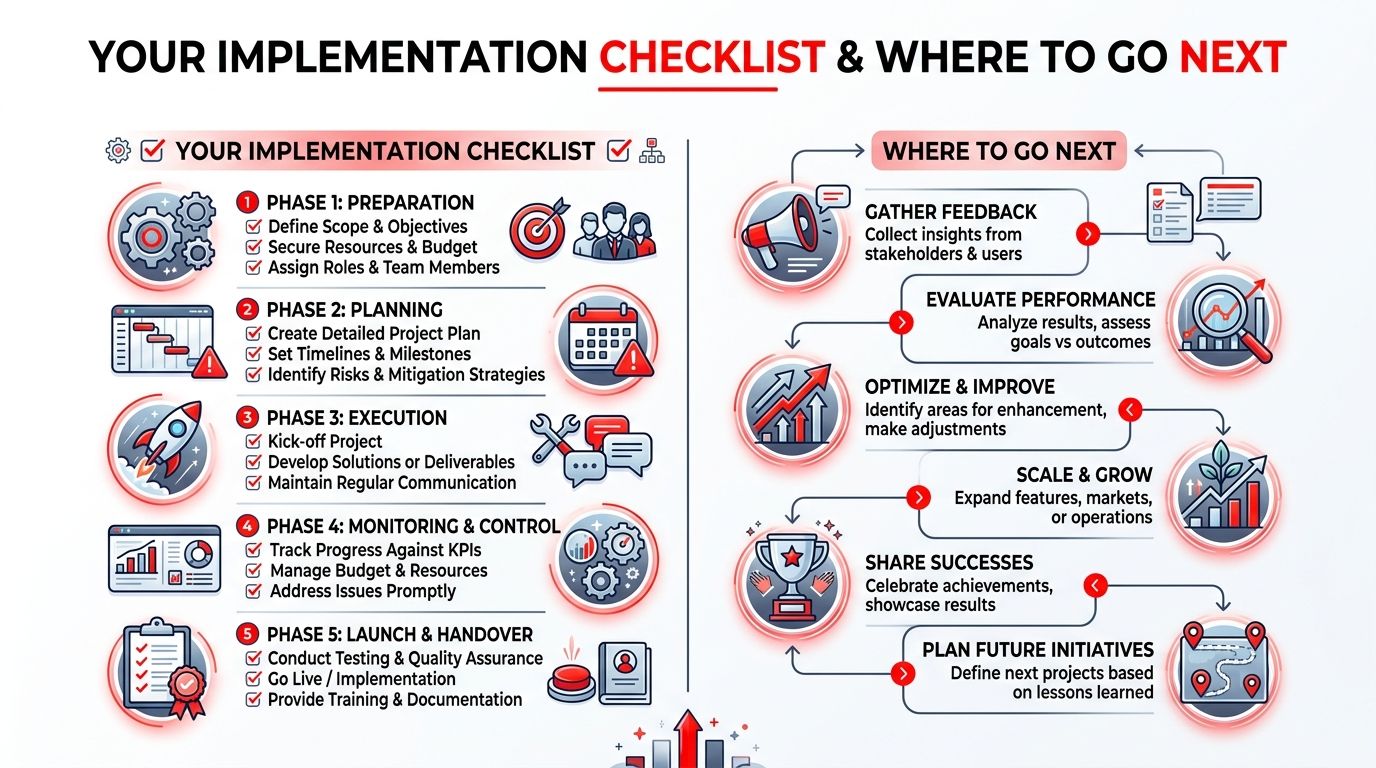
A shop can put the policy into operation through one focused management meeting. The owner or service manager should assign each task to a person, connect it to a RedAppy feature, and set a review date.
- Audit current users. List every account connected to Digital Inspections, invoicing, parts ordering, customer communications, analytics, and Settings. Remove shared logins and disable accounts that no longer belong to active staff.
- Map roles to permissions. Use the matrix above for Owner, Service Manager, Lead Technician, Technician, Service Advisor, and Bookkeeper. Adjust only where a documented workflow requires a different assignment.
- Separate inspection work from invoice approval. Technicians can edit Digital Inspection records and contribute to estimates. Final invoicing approval should remain with the designated manager or authorized advisor.
- Route parts ordering deliberately. Let technicians create parts requests when that matches the workflow, but send approval and vendor decisions through the assigned parts or management role.
- Protect the Digital Shop Board. Keep the board visible for coordination, while limiting stage and workflow configuration to service managers.
- Restrict analytics. Give owners and designated managers access to revenue, technician efficiency, average repair order, and repeat-business reporting. Avoid exposing financial dashboards to roles that don't need them.
- Secure Settings. Reserve payroll, tax, user management, and other administrative controls for owners or explicitly assigned administrators.
- Enroll MFA and document lifecycle events. Register managers and owners first, then complete the same onboarding and offboarding steps for technicians, advisors, and counter staff.
- Schedule reviews. Put a Friday audit-log review on the manager's calendar and a monthly full-user review on the owner's calendar.
RedAppy's shop management platform connects digital inspections, estimates, invoicing, parts ordering, analytics, customer records, and the Digital Shop Board in one workflow, with configurable user roles and permissions. Owners can review the RedAppy features to evaluate role configuration, or contact the RedAppy onboarding team for a guided walkthrough that maps access controls to the shop's actual responsibilities.
RedAppy gives auto repair shops a structured way to connect user roles with inspections, invoicing, parts ordering, customer communication, analytics, and the Digital Shop Board. Visit RedAppy to see how the platform can help the team replace shared access with clear permissions, named accountability, and a workflow that holds up as the shop grows.
Ready to Transform Your Shop?
RedAppy helps auto repair shops create professional digital estimates with photos and videos, send them instantly via text or email, and get customer approvals in seconds. No credit card required to start.