
What Is Shop Management Software? a Simple Guide
The phone's ringing, a technician's asking where a part went, and a customer wants to know what was done on a previous visit. The answers sit on paper, in a spreadsheet, and in someone's memory, so every question starts a search.
That's the moment many owners first ask what is shop management software and whether it can put those scattered answers in one place.
Table of Contents
- Shop Management Software in Plain Terms
- Core Features Every Shop Needs Day to Day
- How One Repair Moves Through the Shop
- Benefits Shops Report and the Numbers Behind Them
- Buying Criteria to Compare Before You Sign
- Decide Whether Your Shop Is Ready for Software
Shop Management Software in Plain Terms
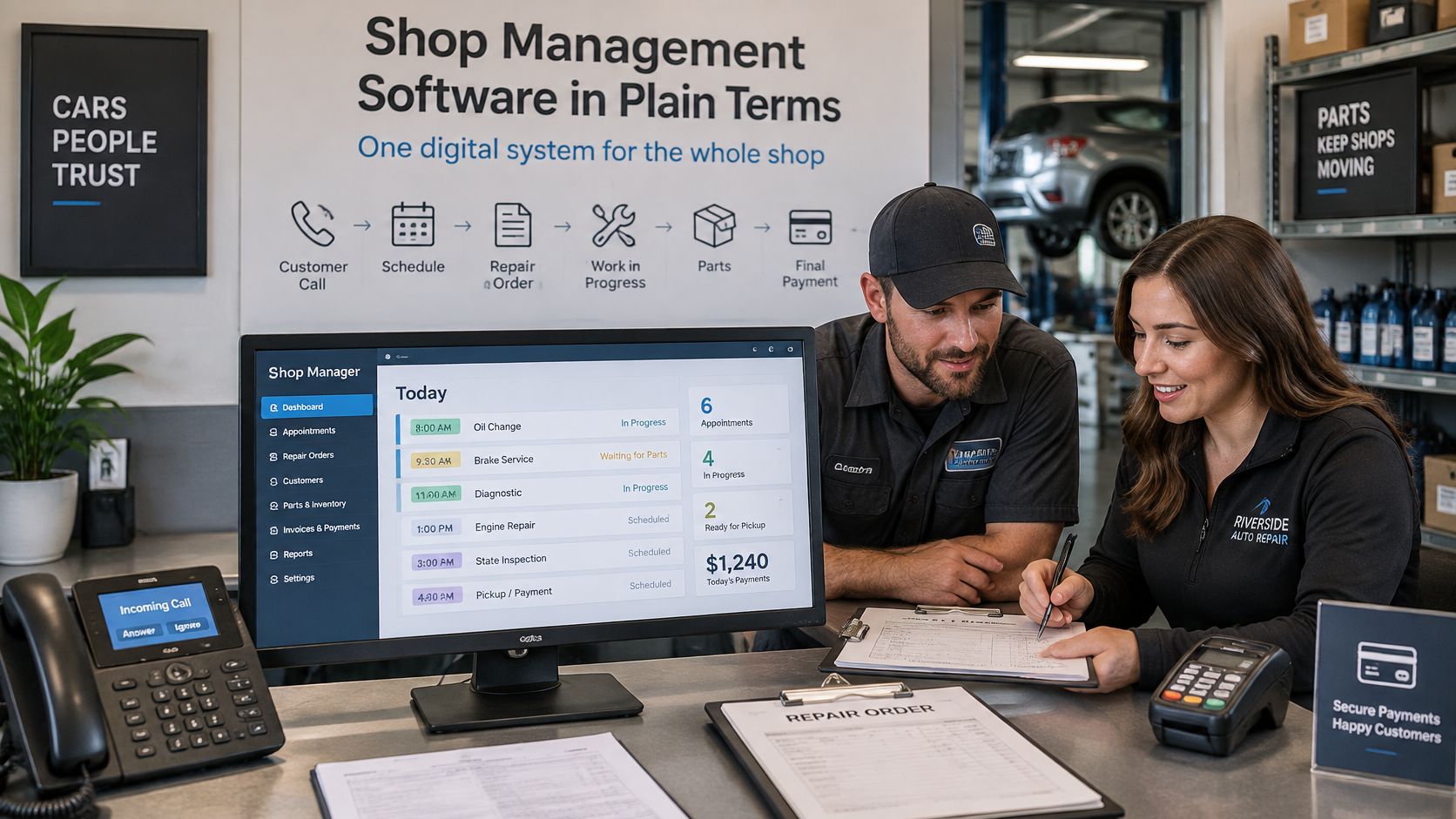
Shop management software is a single digital system that runs an auto repair shop's daily work, from the first customer call to the final payment. It replaces paper repair orders, sticky notes, spreadsheets, and an accounting tool that never talks to the rest of the shop. One record carries the work instead of five loose copies.
Think of a busy kitchen where each station keeps its own order slip. Orders get lost, duplicated, or cooked in the wrong order. One shared ticket rail fixes that, because every station reads the same ticket and knows what's next. The software plays that ticket rail's role for a repair shop.
One record feeding every job
The core idea is workflow integration. One customer record and one vehicle history feed estimates, work orders, parts, invoices, and reports, so nobody retypes the same name, plate, or phone number. That's why it isn't just a scheduling calendar. A calendar shows when a car arrives. This system also links the front desk, technicians, parts, and money behind that arrival.
Say a customer books a brake job. The advisor opens the vehicle history, builds an estimate, and sends it by text. The customer approves from a phone, the technician logs labor against that same job, and the finished work becomes an invoice the customer pays online. Every step stays on one record.
Shop management software connects customer records, vehicle history, scheduling, inspections, estimates, parts, invoicing, payments, and reporting in one shared system.
That shared view helps a single-bay garage as much as a larger operation. A new front-desk employee can find previous repairs without asking the owner. An owner who steps off the floor can still see which jobs are waiting, approved, or finished.
The plain test is simple. Does the shop run on paper, on spreadsheets, or on a single system where each handoff reads the last one? If staff still copy details between tools, the shop has records, but it doesn't have a connected workflow yet.
Core Features Every Shop Needs Day to Day
Most systems share the same core checklist, even when screens and prices differ.
| Feature | What It Handles | Who Uses It Most |
|---|---|---|
| Customer and vehicle records | Name, plate or VIN lookup and full service history | Service advisors |
| Scheduling and team calendar | Appointments, bay use and technician assignments | Front desk and shop foremen |
| Digital inspections | Photos, videos and notes attached to each recommendation | Technicians and advisors |
| Estimates and approvals | Instant estimates sent by text or email with online approval | Service advisors and customers |
| Parts and inventory | Parts and fluids tracked, deducted on jobs, low-stock alerts | Parts staff and owners |
| Invoicing and payments | One-click invoices and online payment | Front desk and owners |
| Reporting and analytics | Revenue, technician efficiency, average repair order and repeat business | Owners and managers |
Who depends on each feature
Customer and vehicle records let advisors pull a history by name, plate, or VIN in seconds, so repeat customers get recognized before anyone picks up the phone. Scheduling shows bays, technicians, and appointments in one view, which stops the front desk from double-booking a lift. Shops weighing booking tools on their own can also to see how standalone booking differs from a calendar tied to jobs and vehicles.
Digital inspections give technicians a place to attach photos, videos, and notes to each recommendation, giving customers evidence instead of a verbal list. Estimates and approvals then let advisors send that work by text or email for online sign-off. Parts and inventory track parts and fluids, deduct them when a job closes, and send low-stock alerts before a shelf runs empty.
Invoicing and payments turn finished labor and parts into one-click invoices with online payment, so the front desk isn't rebuilding bills at closing time. Reporting and analytics track revenue, technician performance, and shop efficiency, which helps owners spot slow approvals or uneven workloads.
Permissions sit underneath all of it. Each shop area, such as Jobs, Customers, Vehicles, Estimates, Invoices, and Inventory, has Create, Read, Update, and Delete permission boxes that can be set per user. A technician can update a job without seeing payroll, and an advisor can write estimates without deleting invoices.
Start with a short, honest list. Write down the three features where the shop loses the most time today. That list tells a buyer where to look first during any demo, instead of chasing every extra on a feature page.
How One Repair Moves Through the Shop
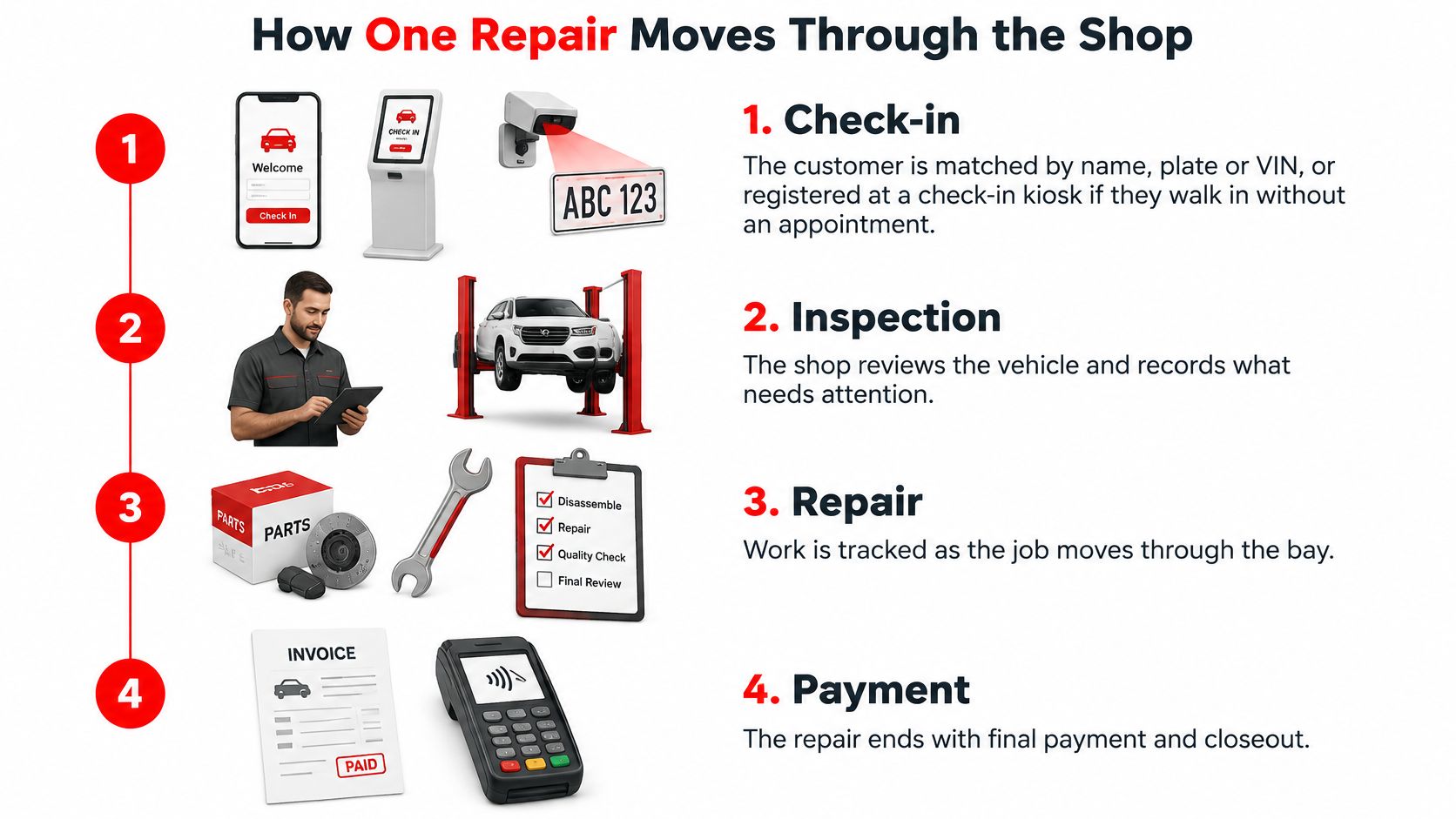
A clear way to judge any system is to follow one car, one customer, and one complaint from arrival to payment. describes this connected model, where inspection findings become estimates and completed labor and parts flow into invoicing and reporting. Photographs, videos, and technician notes make recommended work easier for customers to understand.
Seven stages, one vehicle
- Check-in: The advisor matches the customer by name, plate, or VIN and opens the vehicle's history. A walk-in customer without an appointment can be registered at a check-in kiosk.
- Inspection: The technician records findings with photos, video, and notes. Those findings attach to the vehicle record rather than sitting on a separate form.
- Estimate: The advisor converts approved findings into an estimate using the shop's labor and parts details. Nothing has to be copied from the inspection sheet.
- Approval: The customer approves online or by text, and the approval status shows on the job. The bay isn't held while staff chase a callback.
- Repair: Technicians log labor and parts as work happens. Inventory deducts stock automatically, so the parts count stays current.
- Invoice: Completed labor and parts flow into a one-click invoice. The advisor checks totals instead of rebuilding the bill line by line.
- Payment: The customer pays online and the job closes. The paid work now sits in the vehicle's history for the next visit.
Each stage reads the previous one. That's the practical difference between connected software and a set of separate tools. A phone number typed once stays correct, a part number entered during repair reaches the invoice, and an approval given by text stays attached to the job.
The Shop Board gives the whole team the same picture. It's a Kanban-style board that tracks every job from check-in to checkout, with jobs moving from To Do to Completed and team tasks added alongside them. A foreman can spot a stalled vehicle without walking bay to bay.
Try this trace: Pick one recent job and follow it through all seven stages, noting every place staff retyped information or waited for a handoff.
Those friction points are the buying brief. Managers can then watch measures such as conversion from inspection recommendation to authorization, cycle time from check-in to authorization, technician productivity, comeback rate, and repeat-visit rate to see whether the new flow improved.
Benefits Shops Report and the Numbers Behind Them
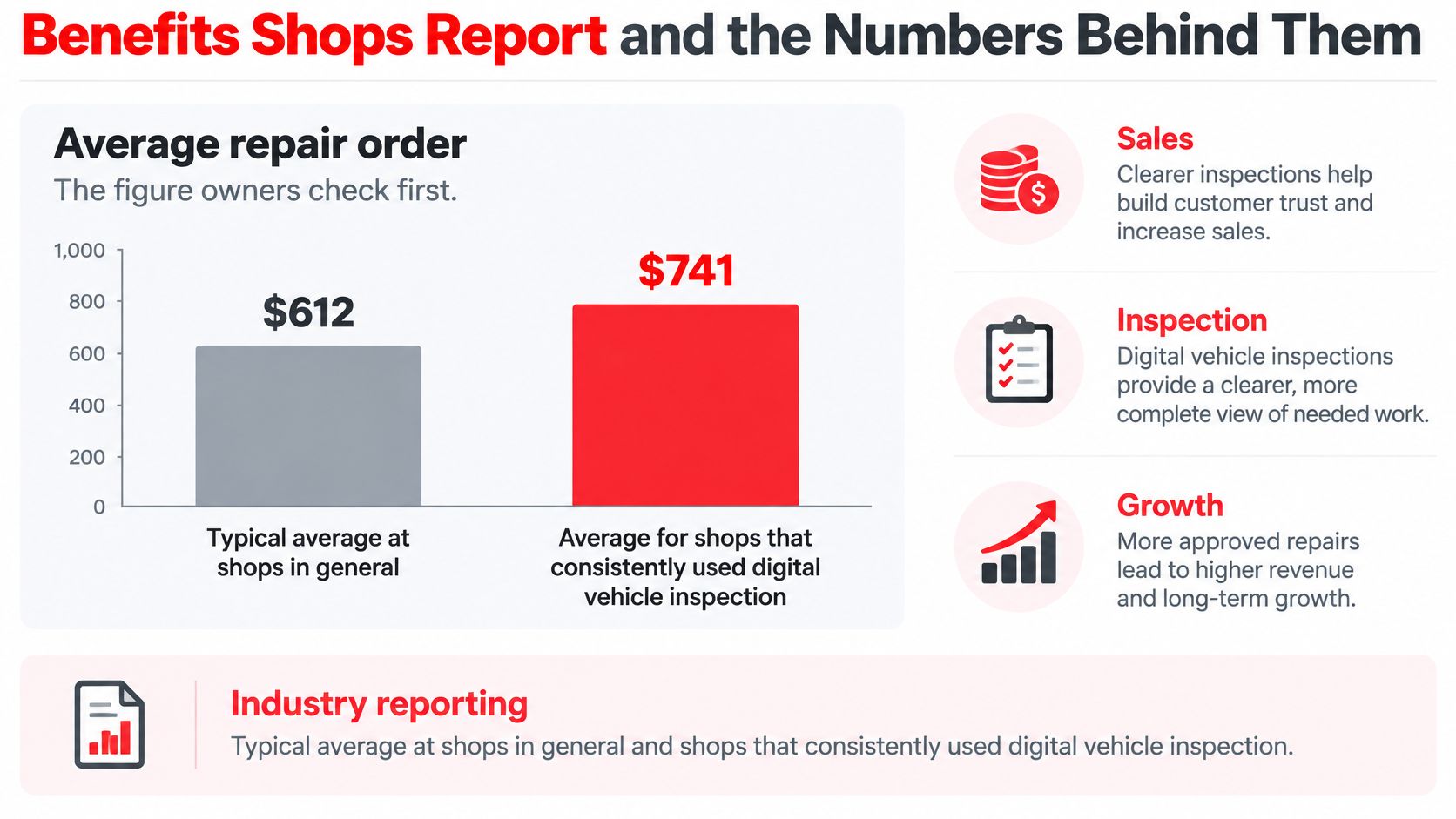
Owners usually check average repair order first, because it shows whether customers approve the work technicians find. found an average repair order of $612 for shops generally, compared with $741 for shops that consistently used digital vehicle inspections, an increase of approximately 21%. The same reporting indicates adding video documentation could raise the average to about $800.
Speed and evidence drive approvals
Approval speed is the second lever. covered 871 dealerships, 16.8 million repair orders, and $5.5 billion in customer-pay work and found digitally delivered estimates received approval in a median of 6 minutes, while phone-based approvals averaged 22 to 23 hours. In that report, 88.2% of digital estimates were approved within an hour, and repair orders containing a digital customer conversation averaged $455.08 in customer pay, compared with $291.12 without one.
Visual proof matters to customers too. reported customers who received dealer-provided photos or videos spent $640 on their repair order, compared with $410 among customers who did not.
| Benefit Metric | Reported Figure | What Drives It |
|---|---|---|
| Average repair order | $612 typical; $741 with consistent digital inspections (about 21% higher) | Visual evidence of recommended work |
| Repair order with video | About $800 average | Video documentation of findings |
| Estimate approval speed | Median of 6 minutes digitally versus 22 to 23 hours by phone | Text or email estimates with online approval |
| Repair orders with a digital customer conversation | $455.08 versus $291.12 without | Documented customer communication |
| Customer spend with photos or videos | $640 versus $410 without | Photos attached to recommendations |
Each result has a plain driver. Visual evidence makes recommended work understandable, so customers decide with confidence. Fast approvals shorten the gap between diagnosis and authorization, freeing bays sooner. Documented messages keep decisions on record, which reduces disputes about what was approved.
Time savings count alongside revenue. Shops save 10+ hours weekly on admin when records, invoices, and payments stop moving between separate tools.
Most figures in this section come from dealership and industry studies rather than single-garage tests, so they show direction, not a promise. A shop should measure its own baseline first. Multiply the current average repair order by monthly car count, then estimate what a 20% lift would add over a year. That number gives any software price a fair test.
Buying Criteria to Compare Before You Sign
Price comes first because it repeats every month. Most systems charge a recurring subscription, so the key question is what the fee covers. RedAppy plans start at $39 per month with a shop website included, which is a useful reminder to compare coverage, not just the headline figure. found 28% of auto shop owners reported having no specific budget for technology, tools, and equipment, so setting a monthly ceiling before demos keeps the shortlist honest.

Security and migration protect the shop
The system will hold customer details, payment-related records, and vehicle histories, so security isn't an extra. recommend limiting administrative access, using separate accounts for individual users, maintaining protected backups, and testing whether backups can be restored. Buyers should ask about multi-factor authentication, encrypted transmission and storage, offline backup copies, breach notification, and recovery-point and recovery-time objectives. Technicians shouldn't receive accounting or payroll access by default.
Migration decides how painful the first week feels. Shops moving from Shopmonkey can export customer and vehicle lists as CSV and send them for import before the trial ends, which avoids retyping records. Contract terms also deserve a close read, including month-to-month versus long commitments and what happens to shop data on cancellation. Initial setup covers shop details, hours, tax and labor rates, and the first staff accounts, so estimates are accurate from day one.
| Criterion | What to Ask | Why It Matters |
|---|---|---|
| Price model | Monthly fee and what it includes; RedAppy plans start at $39 per month with a shop website included | Sets the yearly cost, so compare coverage not headline price |
| Data security | Multi-factor login, encryption, tested offline backups, breach notice | Protects customer, payment and vehicle records |
| Access control | Permissions set per role or user | Keeps technicians out of accounting and payroll |
| Migration | CSV export of customer and vehicle lists and import help before the trial ends | Avoids retyping records |
| Contract terms | Month-to-month or long commitment, and data return on cancellation | Limits lock-in |
| Setup | Shop details, hours, tax, labor rates and first staff accounts | Makes estimates accurate from day one |
| Uptime and recovery | Uptime commitment, recovery-point and recovery-time objectives | Defines how fast the shop returns to work after an outage |
Shortlist three systems and score each against the same seven rows. A system that wins on price but can't export data or restore backups is expensive in a different way.
Decide Whether Your Shop Is Ready for Software
The limits deserve plain words. Software doesn't create skilled labor. said 91.5% of repair shops viewed the technician shortage as having a high or moderate operating impact. A system can surface stalled jobs, reduce duplicate entry, coordinate parts, and standardize inspections. It can't hire technicians, finish their training, or replace certification for safety-critical work such as ADAS calibration. It records that work and routes it to the right person.
The value shows up when the capacity problem is named clearly. Fewer duplicate entries and visible stalled jobs free hours that already exist in the shop.
A four step readiness check
- Name two bottlenecks: Pick the delays that cost the most time or money, such as slow approvals or lost vehicle history.
- Record a baseline: Note admin hours per week, average repair order, approval time, and comeback rate before changing anything.
- Clean the records: Fix duplicate customers and vehicles before any import, so the new system doesn't inherit old clutter.
- Trial against the baseline: Run the system, then compare the same measures after 30 days to see whether throughput moved.
Shops comparing options can review the full feature list to see tools in context, then use the contact page to talk through a specific setup. A custom plan exists for multi-shop operations, while Multi-Location management for several locations from one account is marked Coming Soon on the features page.
Pick the bottleneck that costs the most and book that conversation first.
Ready to replace scattered paper and spreadsheets with one connected workflow for inspections, estimates, invoicing, payments, and the Shop Board? Visit RedAppy to see how the platform fits a single-bay garage or a growing shop, and start with the bottleneck costing the most time today.
Ready to Transform Your Shop?
RedAppy helps auto repair shops create professional digital estimates with photos and videos, send them instantly via text or email, and get customer approvals in seconds. No credit card required to start.