
What Is Workflow Automation and How Auto Shops Use It
The phone rings while a service writer is explaining a brake estimate. A technician is waiting for a parts answer, another customer is asking whether the vehicle will be ready, and a handwritten note with an approval request has disappeared under a stack of repair orders. After closing, the owner still has to reconcile invoices and figure out which jobs stalled during the day.
That kind of day is why shop owners ask what is workflow automation. The answer isn't “software that replaces paperwork.” It's the operating layer that moves a repair order from one person, task, and system to the next according to clear rules. The right setup helps a shop reduce repeated handoffs, keep approvals visible, and give every employee the same process to follow.
Table of Contents
- The Moment a Shop Realizes It Needs Workflow Automation
- What Workflow Automation Actually Means
- The Building Blocks Behind Every Automated Workflow
- How Real Shops Use Workflow Automation Every Day
- Benefits and ROI That Show Up on a Shop's P&L
- How to Roll Out Automation Without Crippling the Shop
- Your Next Steps Toward an Automated Shop
The Moment a Shop Realizes It Needs Workflow Automation
A busy six-bay shop can look productive while work piles up between steps. The service writer takes the customer's concern, writes notes on a repair order, and sends the vehicle to a technician. The technician finds an issue, takes a photo, and calls the front desk. The service writer tries to reach the customer, leaves a voicemail, and moves to the next vehicle.
Nothing is technically broken. Yet each handoff creates another opportunity for a note to be missed, a number to be typed incorrectly, or an approval to sit unnoticed. A parts callback can hold up a technician. A delayed estimate can leave a bay occupied. A paper invoice can wait until evening because the front desk has more urgent work.
Shop-floor rule: If a process depends on someone remembering to move information, it isn't repeatable enough yet.
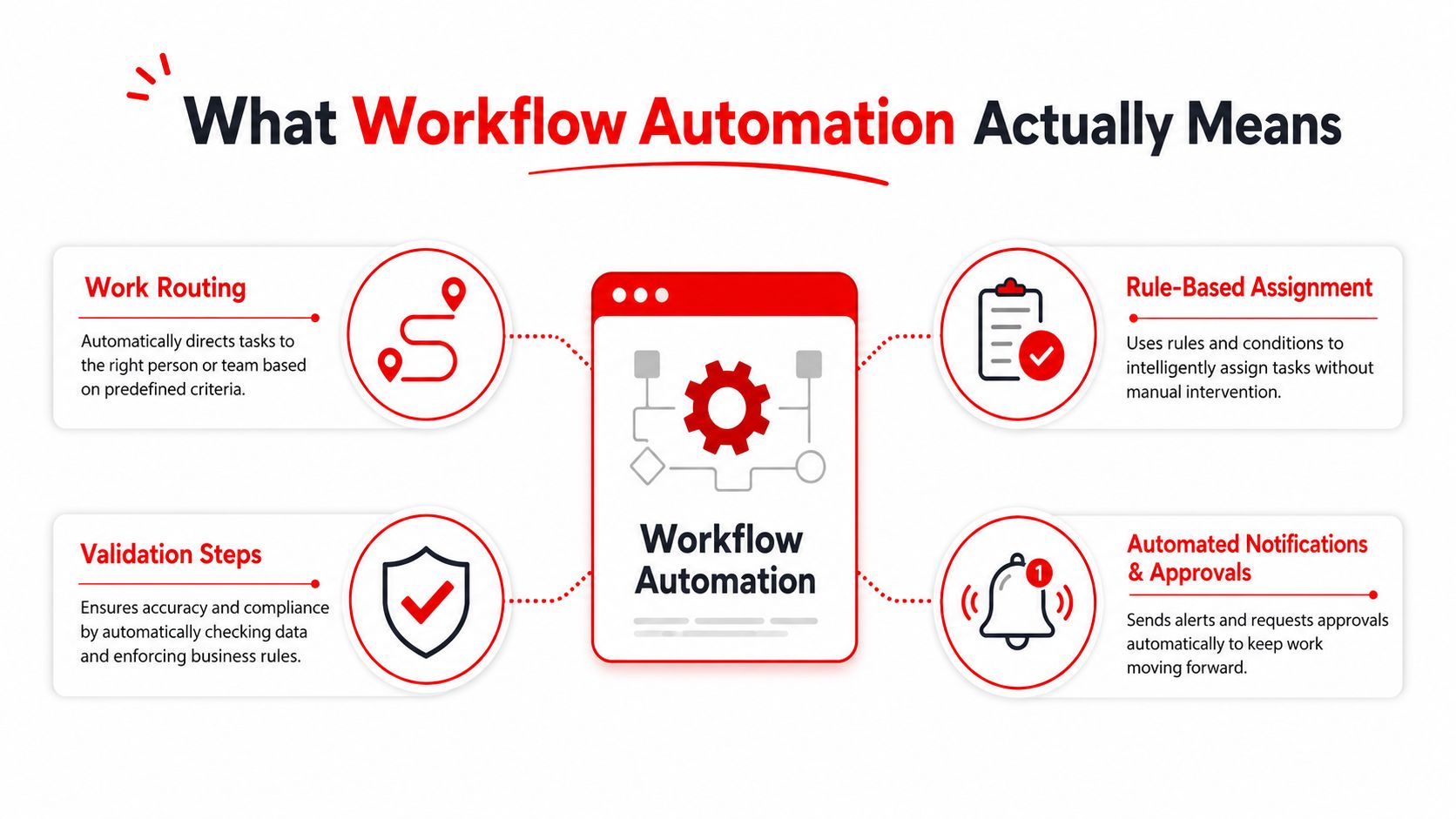
Workflow automation uses software to route work through predefined rules. It can assign tasks, validate information, request approvals, send notifications, and update connected systems without requiring a person to perform every handoff manually. The human still makes the judgment that matters, such as whether a repair is appropriate or whether a safety concern needs immediate attention. The software handles the predictable movement around that decision.
For an auto repair operation, the difference shows up in ordinary moments:
- A completed digital inspection can notify the service advisor.
- An estimate can move to approval without a phone tag routine.
- A customer response can update the repair order.
- A parts request can reach the appropriate supplier.
- A completed job can move toward invoicing and payment.
The rest of this guide focuses on the practical boundary between manual coordination and true automation, the components behind an automated flow, and the workflows shops usually tackle first. It also connects those changes to measures such as approval speed, technician utilization, average repair order, parts margins, and repeat business.
What Workflow Automation Actually Means
Workflow automation is software directing a sequence of work through rules. It handles repetitive steps such as assignment, validation, approvals, and notifications, so a task can move forward without a manual handoff at every stage. In an enterprise setting, that flow may cross several applications. In a repair shop, it may connect an inspection, estimate, customer message, parts order, invoice, and payment request.
A digital checklist isn't automatically a workflow. A checklist records what someone should do. Automation determines what happens after an event, who receives the next task, which information must be present, and what action follows a customer or employee response.
Consider a restaurant kitchen ticket rail. The ticket identifies the order, and each station knows which part belongs to it. The grill station doesn't wait for the cashier to walk over with a verbal reminder. The expediter can see what is ready, what is missing, and what needs attention next.
A repair workflow works in much the same way:
- Trigger: A technician submits an inspection.
- Rule: The system checks whether the inspection includes required information.
- Routing: The estimate goes to the assigned service advisor.
- Approval: The customer receives a message with the repair details.
- Action: The repair order updates after the customer responds.
A task-management tool might show “send estimate” on a service writer's list. An automated workflow can create that task when the inspection is complete, attach the relevant findings, send the customer notification, and record the response in the repair record. That distinction is central to the practical, especially for teams that need fewer disconnected steps rather than another place to store reminders.
The useful test is simple: Does the system enforce the process, or does it merely display the process? If a service writer must remember every next step, the shop has digitized a task list. If the system starts the next step, checks the conditions, and records the result, the shop has automated a workflow.
The Building Blocks Behind Every Automated Workflow
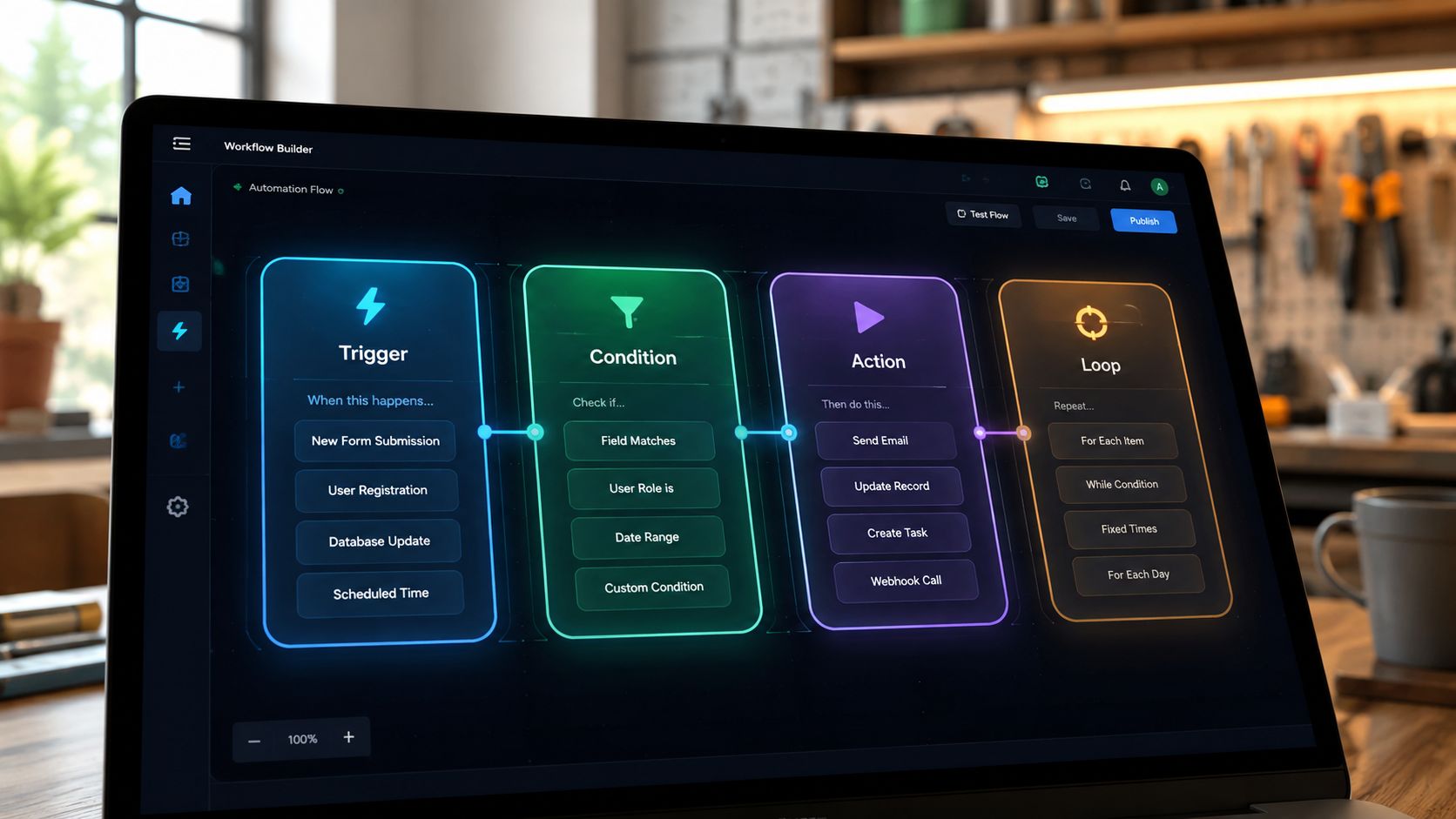
Every automated workflow rests on four components: triggers, conditions, actions, and integrations. A shop doesn't need technical jargon to evaluate them. Each component answers a plain operational question: what starts the work, what decides the path, what does the system do, and where does the information go?
Triggers start the movement
A trigger is the event that begins a workflow. In a shop, that could be a vehicle check-in, a technician submitting a digital inspection, a customer approving an estimate, or a repair order reaching a completed status.
The trigger should be specific enough that the software knows when to act. “The vehicle is being worked on” is vague. “The inspection is submitted” gives the system a clear starting point.
Conditions choose the route
Conditions are the rules that determine what happens next. For example, an inspection may route to a service advisor when it contains a recommended repair. An estimate may require an additional review when the work involves a safety-related finding or a complicated diagnostic decision.
Conditions prevent every repair order from following the same path. They help the shop separate ordinary work from exceptions without forcing the team to rebuild the process each time.
Actions perform the repeatable work
Actions are what the system does after evaluating the trigger and conditions. It might assign a task, generate an estimate draft, send a text message, request an approval, update a status, or create a parts request.
The best actions remove clerical effort while leaving technical and customer decisions with the appropriate employee. Software can send the approval request. The advisor still explains the repair and answers the customer's questions.
Integrations connect the shop's tools
Integrations allow information to move between the shop management system, parts catalogs, supplier accounts, payment processors, and messaging tools. Without that connection, employees may still copy information from one screen to another, which leaves the old handoff in place.
A practical example looks like this: a technician uploads an inspection photo, the system starts an estimate draft, a condition routes the estimate to the assigned advisor, an action sends the customer an approval link, and an integration records the response in the repair order. Each component has a distinct job, but the customer experiences one continuous process.
How Real Shops Use Workflow Automation Every Day
Two shops can have the same number of bays and very different operating days. The difference often comes from what happens between inspection, approval, parts ordering, and checkout.
At Shop A, the service writer begins with a phone call and writes the customer's concern on a clipboard. The technician completes a paper inspection and walks the findings to the front desk. The advisor calls the customer, waits for a response, and writes the approval on the repair order. Parts information moves through phone calls and supplier websites. At checkout, another employee manually enters invoice details and searches for the correct payment information.
That process may work during a quiet morning. During a rush, it creates a queue that no one can see clearly. A customer who approves work may not be updated quickly. A technician may wait for parts while the service writer is handling another call. The owner sees the final paperwork, but not always the point where the job slowed down.
At Shop B, the intake information becomes part of a digital repair order. The technician submits a photo-rich inspection, which gives the advisor a clear record to review. The system sends the customer a repair summary and approval request, then records the response against the vehicle's job.

Parts ordering follows the same handoff logic. Once approved work requires parts, the request can move across connected supplier options with inventory information available to the team. The final invoice and payment request can be prepared before the customer reaches the counter, provided the repair order is complete and the shop's rules allow those actions.
The point isn't that the second shop has eliminated people. It has removed avoidable waiting and re-entry. The technician stays focused on diagnosis and repair, the advisor spends more time on customer communication, and the owner can see which jobs are waiting for inspection, approval, parts, repair, or payment.
Benefits and ROI That Show Up on a Shop's P&L
Workflow automation earns its place when it improves operating results, not just when the software looks modern. Treat each automated step like a tool on the shop floor: connect it to a measurable shop metric, then review the result consistently.
Administrative time is often the clearest starting point. Removing repeated data entry, approval chasing, or invoice preparation gives the front desk more capacity during the same operating hours. That time can support quicker customer responses, more complete estimates, or smoother scheduling.
The wider market shows why owners are evaluating this category. The global workflow automation market was valued at about $26.5 billion and is projected to exceed $78 billion, according to. The same source reports that 66% of organizations have automated at least one function. These figures describe the wider market, not a guaranteed outcome for an individual shop, but they show that software-managed work has moved beyond isolated experiments.
Many organizations report achieving ROI within 12 months. Industry discussions also cite strong multi-year returns for workflow automation platforms. Those broad reference points are not promises for a repair shop. Build the local case from current delays, labor costs, approval steps, and revenue measures.
| Automation Benefit | Shop Metric It Moves | Representative Impact |
|---|---|---|
| Faster estimate delivery | Approval response time | Less waiting between inspection and customer decision |
| Fewer repeated entries | Administrative labor hours | More front-desk capacity for calls and customers |
| Clearer repair status | Technician utilization | Earlier visibility into jobs blocked by approval or parts |
| Consistent parts routing | Parts margins and comeback risk | Fewer ordering misunderstandings and duplicate lookups |
| Easier checkout | Invoice completion time | Less counter congestion and fewer end-of-day entries |
| Centralized records | Repeat-customer rate | More consistent follow-up and vehicle history |
A shop can turn the table into a simple baseline. Record how long estimates wait for approval, how often staff re-enter customer or vehicle details, and how many jobs pause for missing information. After automation is introduced, compare the same measures rather than relying on impressions.
Peer-reviewed literature reports that workflow automation can reduce manual processing time by up to 75% and increase throughput by 200%, as described in this technical workflow automation benchmark. A shop should not copy those figures into its forecast without testing its own process. The practical lesson is narrower and more useful: fewer handoffs can shorten the critical path, helping the team handle more work without adding the same amount of manual coordination.
How to Roll Out Automation Without Crippling the Shop
A shop shouldn't automate everything at once. The safest rollout starts with one process that creates visible friction and has a clear beginning and end, often estimate approval or parts ordering.
The owner, service advisors, technicians, and foreman should map the process together. The advisor knows where customer communication stalls. The technician knows which inspection details are often missing. The parts coordinator knows where supplier information gets repeated. A workflow designed without those employees may look logical on paper and fail at the first real repair order.
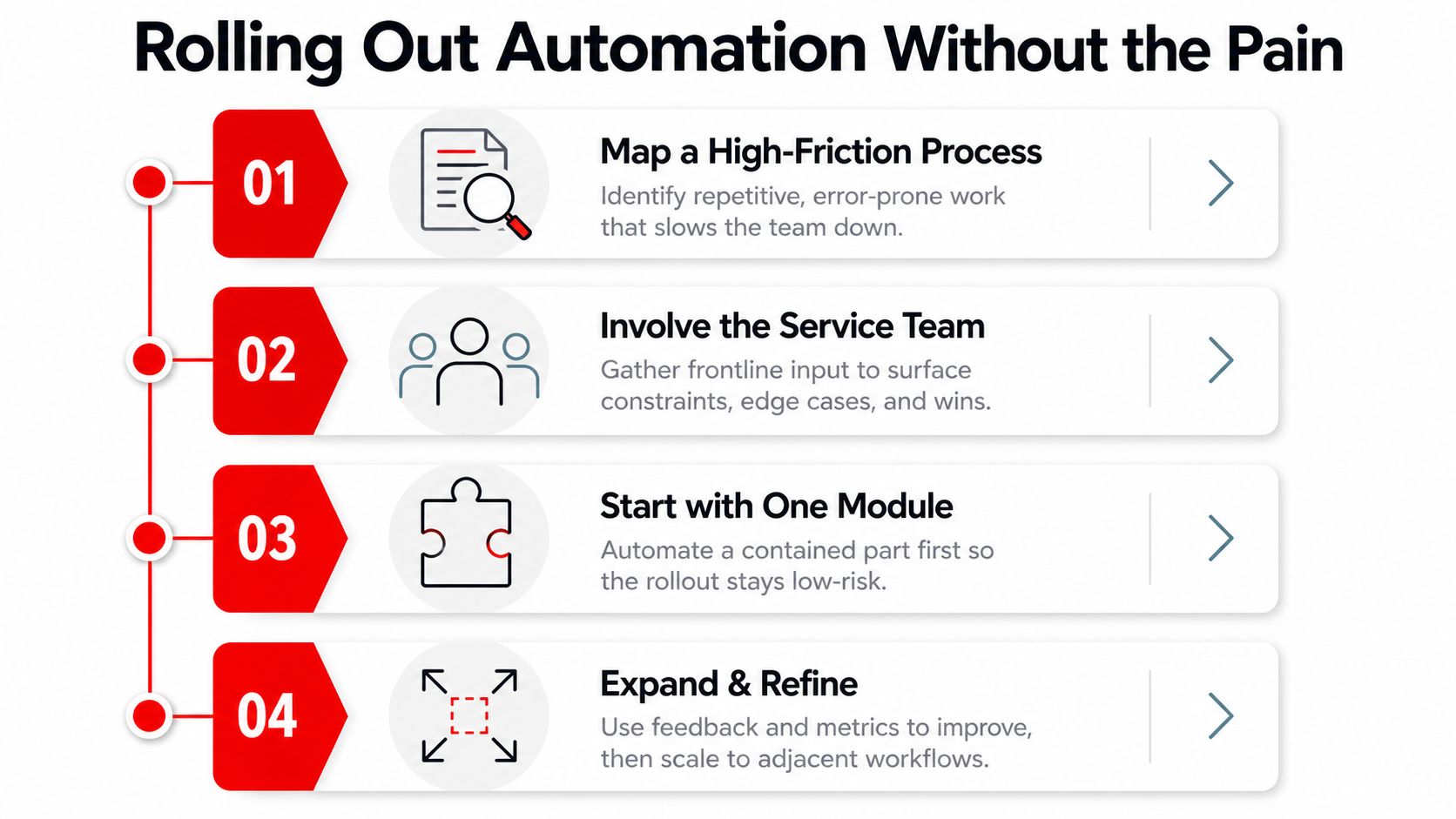
A practical rollout usually follows this sequence:
- Map the current path: Record each handoff from customer request to completed task, including waiting points and duplicate entries.
- Choose one module: Start with a contained process, such as digital inspection to estimate approval, rather than redesigning the entire operation.
- Run a side-by-side pilot: Let the team compare the new flow with the old method while employees learn where the system needs adjustment.
- Review the evidence: Track two or three relevant measures, then refine the rules before expanding to another process.
Over-customization causes trouble early. A shop may try to encode every exception before the team understands the basic flow. That creates a complicated system that employees avoid. A simpler first workflow gives the team a reliable foundation and makes unusual cases easier to identify.
Training matters just as much as configuration. Technicians need mobile-friendly inspection screens, advisors need clear approval status, and managers need analytics that show blocked work. Integrations also deserve attention before launch, especially when the process depends on parts suppliers, payment tools, messaging, or the existing shop management system.
Implementation advice: A workflow should make the correct next action easier than the old workaround.
The platform's commercial terms matter too. Transparent month-to-month pricing, practical customization, and usable reporting reduce the risk of forcing the shop into a process that doesn't fit its staffing or service mix. Success should be judged after the team has enough real repair orders to expose delays, not after a short demonstration.
Your Next Steps Toward an Automated Shop
The first decision isn't which software to buy. It's which handoff costs the shop the most attention today. Approval delays, missed calls, parts back-and-forth, and invoice lag each point to a different starting workflow.
The owner can select one of those problems and track two measures for 30 days, such as time from inspection submission to approval and time from job completion to paid invoice. The baseline doesn't need to be perfect. It needs to be consistent enough to show whether the new process reduces waiting, repeated entry, or unclear ownership.
A purpose-built platform such as RedAppy brings several shop workflows into one operating environment, including digital inspections, estimates, one-click invoicing, online payments, parts ordering across multiple suppliers, real-time analytics, a Kanban-style Digital Shop Board, and an AI Repair Assistant. Its workflow model maps directly to the patterns described above, moving jobs from check-in and inspection through approval, repair, and checkout while keeping related information together.
Owners who want to understand how the setup might fit a single-bay garage, a growing independent shop, or a multi-location operation can contact RedAppy with the workflow causing the most friction. Those who prefer to assess the available tools first can review the RedAppy features and compare them with the shop's current approval, parts, invoicing, and reporting process.
The objective isn't technology for its own sake. It's a calmer handoff between the bay and the front desk, faster customer decisions, fewer forgotten tasks, and a clearer view of the numbers that keep the shop healthy.
RedAppy connects digital inspections, estimates, approvals, parts ordering, invoicing, payments, and shop-board visibility in one workflow designed for auto repair operations. Visit RedAppy to see how the platform can help the team replace manual handoffs with a clearer path from first call to final payment.
Ready to Transform Your Shop?
RedAppy helps auto repair shops create professional digital estimates with photos and videos, send them instantly via text or email, and get customer approvals in seconds. No credit card required to start.